


Indirizzo: Via Giuseppe Dezza 36, 20077 Melegnano (MI), Lombardia, Italia.
Email: bittarelli.l@gmail.com
Telefono/Whatsapp: +39 029836500
P.IVA: IT10921120969


The software you're looking at represents the most advanced technology in embroidery today. With the innovative features of Creative DRAWings®, you can easily transform your creative ideas into beautiful designs for embroidery on your machine.
Creative DRAWings® isn't like other embroidery software on the market. It's designed to bring your ideas to life, allowing your imagination to flow freely. This means you don't have to worry about technical issues when creating your embroidery.
All you need to get started is an image!
It could be clipart, an existing embroidery file, or other compatible vector and bitmap files to create unique embroidery designs. The software includes tools to help you draw your ideas directly on your monitor screen and, with just a few clicks, transform them into personalized creations.
New and original embroidery designs you can proudly share with your family, friends, and other embroidery enthusiasts are easily at your fingertips. Creative DRAWings® is powerful yet incredibly easy to use. Everyone—and we mean EVERYONE—can be creative! You love your hobby and deserve to enjoy it; let your imagination run wild… be creative with Creative DRAWings®!
DRAWings® is a multifunctional software with an impressive list of features, designed to be used for graphic design, textile and screen printing, embroidery, computer quilting, cutting and stenciling, and creating crystal designs.
The Pro version is the complete version of the program, ideal for those who demand the best. It includes all the tools of the other versions (Essentials and Creative), but includes many new possibilities for creating amazing embroidery. Like the brand new automatic creation of floral designs that dynamically fills selected areas with compositions of leaves and flowers. Or the beautiful " shaded colors " function to manage the shading of colored threads in the design, blending them together with different densities. With DRAWings® Pro you can also fill shapes with spiral designs or with a sunburst effect. The " curved stitches " function then guides the machine's stitches to follow the direction of the design's curvature, offering truly surprising results.
COMPREHENDS:
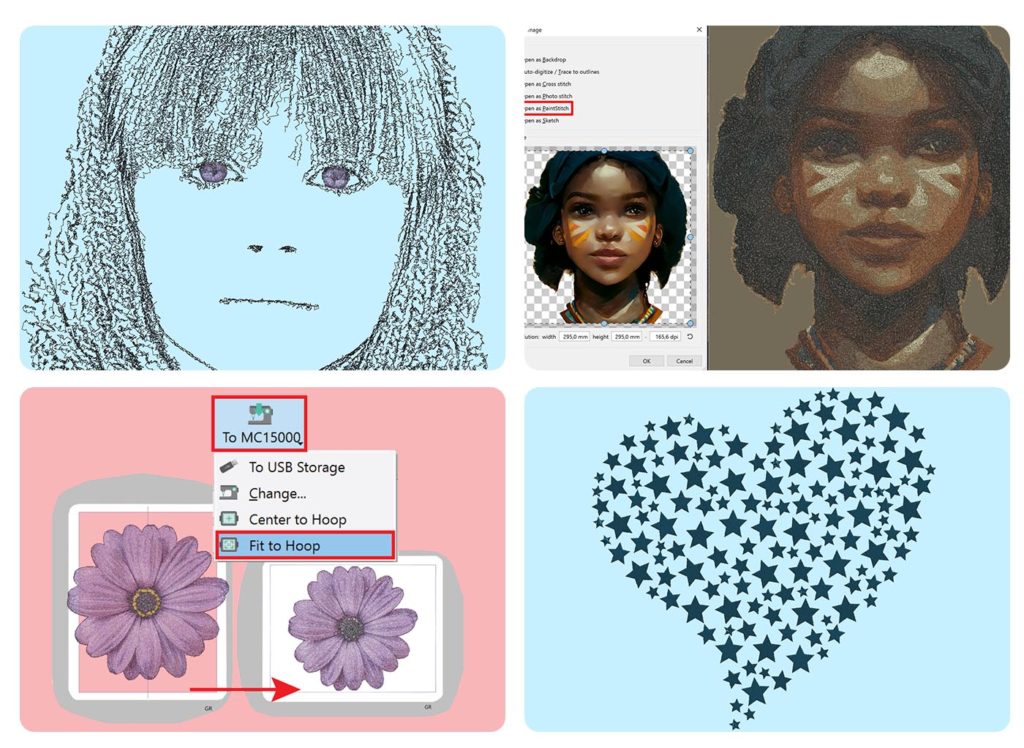
Compared to DRAWings PRO XI, the XII edition has more than 50 new features. The most important are the following.
SKETCH FUNCTION
This edition of DRAWings PRO lets you transform an image into a black and white drawing with a "sketch" effect. The great advantage of using this feature is that the drawing will be generated to cover only 20% of the total area, saving on embroidery thread and creating a design ideal for embroidering on delicate or stretch fabrics, such as t-shirts. While an image created with paintStitch requires 120,000 embroidery stitches, an image created with Sketch will require only 30,000. The drawing is designed to be created with a single black thread, minimizing thread changes and processing time, but you can choose up to 7 shades of gray. Adjusting the image brightness or pencil thickness will produce different results and change the number of stitches (the darker the image, the more stitches you'll need).
TRIM AND ROTATE BITMAP FILLS
In the previous edition, it was not possible to edit embroidery designs created with the Cross-stitch, Photostitch, or PaintStitch functions. These images were generated in a rectangle that could not be modified. With the XII edition, you can cut out part of the image, mask it with a shape, rotate it, or skew it. If you place an object large enough over the image, a hole will now be created in the image to remove the overlap. These functions (including the Sketch function) also support PNG files and handle transparency, generating embroidery stitches only where the image is located, without creating a background as was previously the case.
START AND END POINT / ORDER / THREAD CUTTING
A revolutionary and intuitive new tool for determining the start and end points for embroidering each object. The tool works on each individual color layer. The entire execution sequence is displayed graphically, and the user can modify it. It's possible to change both the start and end points, as well as the order in which the program chooses to embroider the various objects. You can also decide where and whether to add/remove thread trimming.
NEW PROPERTIES WINDOW
The properties window has been completely redesigned for greater usability, with property type groups that can be collapsed to create more space in the workspace. Furthermore, when not needed, the properties windows are not displayed.
SMART FILLING
Already in the XIth edition, it was possible to fill an object with any shape (e.g., a circle filled with stars). The new feature introduced in the XIIth edition is the ability to automatically generate copies of the shape used for the fill, which are resized and/or rotated to best fill the entire available area.
NEW FLORAL FILLING
In the XIth edition, the floral fill was generated by starting from a main branch from which many smaller branches branched out. In the XIIth edition, a new type of floral fill was added, more similar to a climbing plant that unravels more evenly to fill the available space.
VERTICAL TEXT
In this XII edition it is also possible to insert text vertically.
ENHANCED MANUAL MODE
With the new manual mode, the fills and outlines of objects are separated so they can be managed separately. You can then decide for each object to enable/disable the thread trimmer or apply a forced machine stop. When you insert a new object, it is no longer placed at the end of the sequences but is added immediately after the currently selected object. When you delete a design element, the selection does not disappear and the object in the sequence following the deleted one is immediately selected. All connection points between objects are now visible.
COLOR SELECTION
In this edition, the ability to select colors by color code based on the yarn brand, by description (e.g. green, yellow, etc.) or by RGB code has been added.
FIT TO FRAME
With this feature added in this XII edition the program, upon user request, can adapt any design to the frame automatically.
SHOW/HIDE OBJECTS
Unlike the previous edition, you can now show and hide objects while designing an embroidery design. This feature is very useful: when you need to edit some background objects, it can be handy to hide the foreground objects.
CHANGING DENSITY IN EMBROIDERY FILES (RAW)
With DRAWings PRO XII, you can change the density even of embroidery files (raw) that were not designed with DRAWings. You can change the density of a section without changing its size by up to +/- 25%.
REMOVAL OF EXCESS KNOTS
This edition also includes a feature that allows you to trim excess nodes in a path. This feature only applies to curved nodes, not square nodes, so you can still maintain every edge of the shape.
Compared to other versions, DRAWings Pro has a feature that will allow you to make your embroidery unique. This is the gradient effect, which organizes the stitch density to create beautiful gradients.
This is a revolutionary new feature that dynamically creates floral designs and fill areas to apply to your drawings. You can use available patterns or create your own floral designs to use for fills. The combinations are unlimited.
Thanks to this powerful feature, you can now make embroidery stitches follow the direction of the design. The resulting effect is that of moving embroidery, thanks to the sinuous lines that are no longer simply straight.
You decide where the embroidery of each individual object should start and end and order the elements as you wish.
In addition to what is indicated for DRAWings XI Essentials version and Creative version, the PRO version has the following additional features
ADDITIONAL FUNCTIONS COMPARED TO THE ESSENTIALS AND CREATIVE VERSIONS
CREATIVITY
EMBROIDERY TOOLS
EDIT TOOLS
EMBROIDERY OPTIMIZATION
WORK AREA
Shipping times: Shipment is prepared within 5 business days. Shipment within 24-48 business hours for Italy.


